Guide · Checked November 3, 2026
Best exterior paint visualizer: free tools compared
Short answer: there is no single best one. Pick by what you start from. With no photo, a sample-home visualizer is the quickest way to compare whole color schemes. If you already know your paint brand, use that brand's free visualizer for exact color codes. If you want AI to find the siding, trim and doors in a picture you take, use an AI photo tool, which usually costs money after a free start.
We make House Color Preview and the Exterior Paint Visualizer iPhone app (by JanoGroup LLC), so both appear below next to the others. Every claim about another tool comes from that tool's own page, checked on November 3, 2026; see the sources at the end.
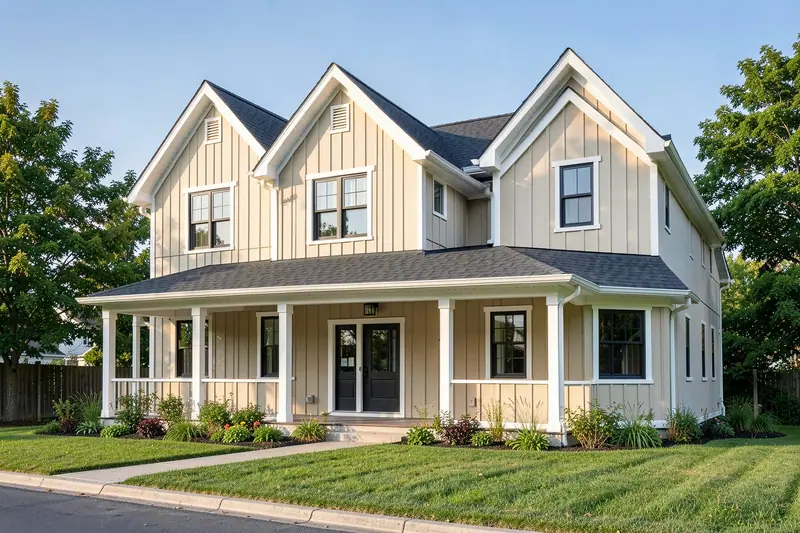
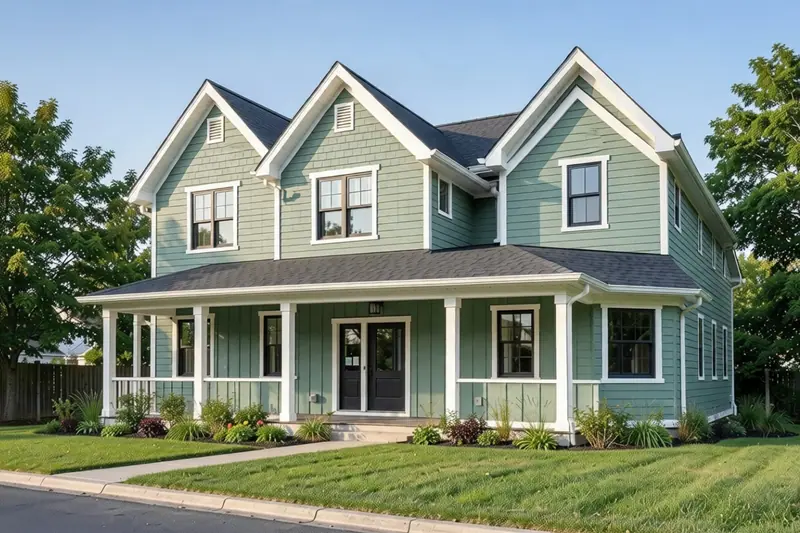
- Body Sage Leaf
#A9B39A - Trim Cotton Cream
#F1E7CF - Door Deep Forest
#2F3D33
- Body Harbor Navy
#2C3A4F - Trim Bright Snow
#FAFAF7 - Door Mustard Gold
#C79A3B
- Body Warm Pebble
#A69E92 - Trim Chalk White
#F3F0E8 - Door Cranberry
#8E2F3B
Modern farmhouse sample home, generated with AI and repainted with AI. Colors are approximate; test real samples before you paint.
What a sample-home visualizer shows
The same farmhouse sample home before and after, in three schemes. Drag the slider, tap a scheme. Nothing to install and no photo needed.
Exterior paint visualizers compared
Free or free-to-start tools for house exteriors. "Your photo?" means the tool can work on a picture you take, rather than only on its own sample scenes.
| Tool | What it does | Your photo? | Colors | Cost | Platforms |
|---|---|---|---|---|---|
| House Color Preview: sample homesThis site | Before and after photos of eight sample home styles in eight color schemes. Tap a scheme to switch instantly. | No, sample homes only | Our own named colors, not brand paints | Free, no account | Any browser |
| House Color Preview: color combination toolThis site | Pick a body color and get trim and front door suggestions with a light/dark contrast and warm/cool check, next to the closest sample-home photo. | No | Our own named colors | Free, no account | Any browser |
| Sherwin-Williams Color VisualizerPaint brand, web | Add colors to a palette, then choose a scene or add a photo to paint virtually. | Yes | Sherwin-Williams colors | No fee listed | Browser |
| Sherwin-Williams Color ExpertPaint brand, app | Snap a photo and try colors; a 2026 update lets it tint exterior surfaces such as siding, trim, shutters and doors. | Yes | Sherwin-Williams colors | Free | iPhone, Android |
| Behr Color VisualizerPaint brand, web | Sample rooms, or add a photo of a room you want to paint. Behr describes it for rooms; exteriors are not mentioned on that page. | Yes (described for rooms) | Behr colors | No fee listed | Browser |
| Benjamin Moore Color PortfolioPaint brand, app | Photo Visualizer: take a photo and tap a surface to mask it, or use the inspiration gallery. Also a live camera (AR) mode. | Yes | Benjamin Moore colors | Free | iPhone, iPad, Android |
| Housepaint AIAI photo tool | AI detects walls, trim, doors, shutters and siding automatically, then recolors the surfaces you pick. | Yes | 19,800+ colors from seven paint brands | 5 free credits, then pay per credit (no subscription) | Web, iPhone, iPad, Android |
| Exterior Paint Visualizer app (ours)AI photo app | The app paints a photo of your house with AI: choose siding, trim, shutters, doors and more, then compare before and after. | Yes | Named paint colors with codes, plus curated palettes | Free download; AI previews in the app need a subscription ($7.99/week or $39.99/year) | iPhone, iPad |
"No fee listed": the tool's page shows no price. Features and prices change; check each tool's own page before you rely on it.
How to choose
You just want ideas and have no photo handy
Use a sample-home visualizer. Ours shows eight house styles in eight schemes, and the color ideas show proven body, trim and door schemes on six house styles each.
You already know which paint brand you will buy
Use that brand's own visualizer. You get its exact color names and codes to take to the store. The Benjamin Moore and Sherwin-Williams apps are free, and the brands' web visualizers list no fee.
You need trim and front door colors for a body color you like
Use the color combination tool. It explains contrast and warm/cool balance instead of leaving you to guess.
You want your actual house, without tracing every edge
Use an AI photo tool. AI finds siding, trim and doors for you; manual tools make you brush or tap each surface. Expect to pay after a free start.
You are on Android
Sherwin-Williams Color Expert, Benjamin Moore Color Portfolio and Housepaint AI all list Android versions. Our app is iPhone and iPad only.
Is there a free AI exterior paint visualizer?
Not a fully free one that we can point to. AI photo tools usually give you a free start and then charge. Housepaint AI, for example, gives 5 free credits and then charges per credit.
This website has no AI tool, and it doesn't take photos. Our AI previews run in the Exterior Paint Visualizer app for iPhone and iPad. The app is a free download, but its AI previews need a subscription ($7.99/week or $39.99/year). To compare colors for free without AI, use the sample homes, the color combination tool or a paint brand's own visualizer.
Tips for accurate results
- Shoot in even daylight. Photograph the front of the house straight on, on a bright overcast day or with the sun behind you. Harsh shadows and sunset light skew every tool.
- Keep what you can't change. Roof, brick, stone and windows stay. Check the new body and trim colors next to them, not just next to each other.
- Compare against the original. AI tools can blur or alter small details such as railings or window grids. Look at the before and after side by side.
- Treat screen colors as approximate. Phones and monitors show the same color differently, and paint usually looks lighter and brighter outdoors than on screen or on a small chip.
- Test real samples. Paint large samples (at least 2 by 2 feet) on two sides of the house and look at them in morning and late-afternoon light before you buy.
Want proven starting points? Browse the exterior color ideas, then check trim and door options in the color combination tool.
Questions
What is the best free exterior paint visualizer?
It depends on what you start from. With no photo, a sample-home visualizer like the one on this site is the fastest way to compare whole color schemes, free and with no account. If you have a brand in mind, its own visualizer is free and gives you exact color codes. Benjamin Moore Color Portfolio and Sherwin-Williams Color Expert are free downloads.
Can I add a picture of my house on this website?
No. This website shows sample homes only and does not take photos. To try colors on your house, use a paint-brand visualizer or the Exterior Paint Visualizer app for iPhone and iPad, which is a free download; its AI previews need a subscription.
Is AI or manual masking better?
AI is faster: it finds siding, trim and doors on its own, but it can miss or change small details, so compare the result with your original photo. Manual tools take longer but give you full control over every edge. Both only approximate real paint.
How accurate are exterior paint visualizers?
Only approximately. Screens differ, and outdoor light changes how paint looks through the day. Sherwin-Williams itself warns that actual color may vary from the on-screen representation. Use any visualizer to narrow your choices, then paint large samples on the house before you buy.
Sources
Checked November 3, 2026. Brand and product names are trademarks of their owners; we are not affiliated with or endorsed by any of them.
- Sherwin-Williams Color Visualizer: sherwin-williams.com
- Sherwin-Williams Color Expert: sherwin-williams.com and its App Store listing and Google Play listing (com.sherwin.diy) (free; iPhone and Android; a 2026 update, version 2.6.0, added exterior surfaces)
- Behr Color Visualizer: behr.com
- Benjamin Moore Color Portfolio: benjaminmoore.com and its App Store and Google Play listings (free; iPhone, iPad and Android)
- Housepaint AI: housepaint.ai (features, pricing FAQ and mobile apps)
- Exterior Paint Visualizer app: our app page and the App Store listing